Diff View
Hello,
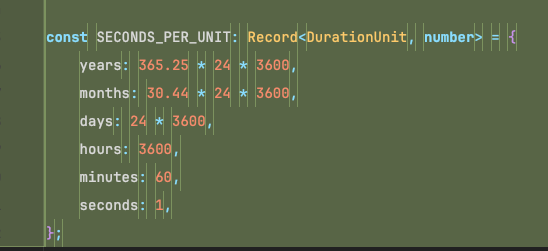
I noticed when viewing the diff, there’s now a line before/after the words or symbol which you can see in the image below. I thought it might be an editor setting but when switching themes, the problem goes away.
If this is intended, could we have a setting to disable it?
Thank You!
Log in to comment and vote
Comments5
rvanhorn
Apr 7
Ok here’s what I changed that seems to have fixed it for me.
DIFF_CONFLICT —
#f78c6c→#3b3020DIFF_DELETED —
#f07178→#3b2d2dDIFF_INSERTED —
#c3e88d→#2d3b2dDIFF_MODIFIED —
#82aaff→#2d3a50rvanhorn
Apr 3
Are you not having this issue on Webstorm 2026.1?
rvanhorn
Mar 26
Ok so now on 2026.1 and seeing the issue again.
rvanhorn
Mar 24
Hello,
Looks like my IDE was updated to 2026.1 RC. Downgrading back to 2025.3.4 seems to resolve the problem.
vira
Mar 24
Hello, we haven’t released any theme changes this month and we’re unable to reproduce the issue with Idea
2025.3.4. Could you please provide more details? What steps did you take to open the diff? Also, which IntelliJ IDE (and version) are you experiencing the issue with?Also, check if you’ve made any theme customisations and revert them to default by navigating to Settings > Editor > Colour Scheme