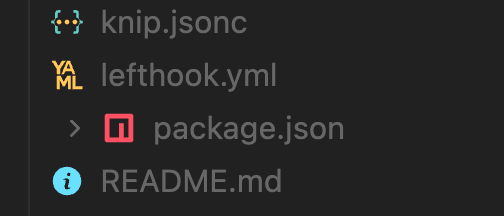
Hello there, this is a known issue with VS Code Interface, the arrow icons are not aligned with other icons, no matter if `hidesExplorerArrows` is true or not. The arrow icons used for nested files are not aligned with other icons, they follow a different grid, and we can’t change/remove those arrows neither.
We don’t have any control on it unfortunately. See the following screenshots taken with other extensions and built-in icons, you can notice the same issue:
Log in to comment and vote
Comments2
Céd.
Oct 13, 2025
It happens only when
"viraTheme.hidesExplorerArrows": true,vira
Oct 13, 2025
PinnedHello there, this is a known issue with VS Code Interface, the arrow icons are not aligned with other icons, no matter if `hidesExplorerArrows` is true or not. The arrow icons used for nested files are not aligned with other icons, they follow a different grid, and we can’t change/remove those arrows neither.
We don’t have any control on it unfortunately. See the following screenshots taken with other extensions and built-in icons, you can notice the same issue: