Improve readability of warning highlights in JetBrains IDEs (Vira Carbon)
Hi,
I’ve been using the Vira theme (specifically the Vira Carbon variant) and really like the overall aesthetic—great work on it.
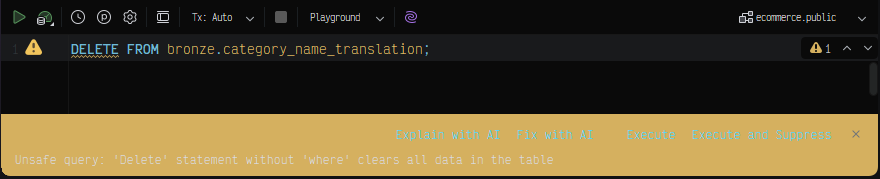
I wanted to report a usability issue regarding warning highlights (such as the yellow background used for things like unsafe SQL queries). In JetBrains IDEs, these warnings are quite difficult to read due to low contrast between the background and the text.
For clarity, I’m using the theme as-is with no additional customization or personalization, so this appears to be the default behavior of Vira Carbon.
Suggestions:
Increase contrast between the warning background and text (e.g., darker text or adjusted background tone)
Consider slightly desaturating or darkening the yellow
This would significantly improve readability and reduce eye strain when dealing with warnings.
Looking forward to future updates!
Log in to comment and vote
Comments3
vira
Mar 30
Hello there, could you please share the steps to display this warning?
Isaías Santiago Toribio
Mar 31
Hi, thanks for the quick response!
You can reproduce this warning in a JetBrains IDE (I’m using the Vira Carbon theme with no customizations) by doing the following:
Steps to reproduce:
Open any JetBrains IDE (e.g., IntelliJ IDEA, WebStorm, PyCharm)
Make sure the Vira Carbon theme is selected
Open a SQL file or use the database console
Run or write a query like:
DELETE FROM some_table;The IDE will show a warning like:
“Unsafe query: 'Delete' statement without 'where' clears all data in the table”
Issue:
The warning banner and/or highlighted text uses a yellow background with low contrast, making the text hard to read.
vira
Mar 31
We fixed the issues and releasing it in
2026.4.1