Release notes

Follow new updates and improvements to Vira Theme.

March 5th, 2026

JetBrains

This release introduces a new setting for island spacing and updated file icons.

NEW

  • Add icons for more files

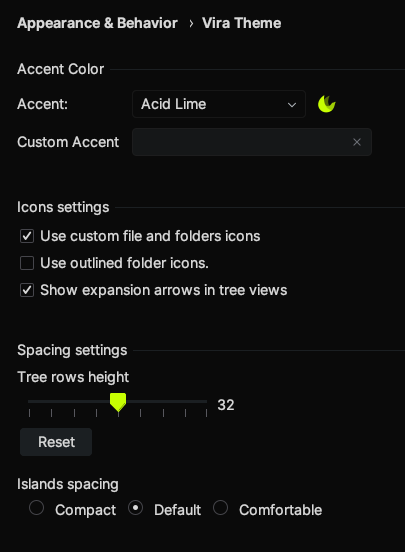
  • Introduce a new setting to select the space between islands from three pre-defined options.

IMPROVED

  • Update the icons on old files with new logos.

  • Fix the missing file icon association.

March 3rd, 2026

VS Code

Hello friends, this release is all about UI fixes and icons updates!

NEW

  • Add new file and folder icons

IMPROVED

  • Remove distracting border in the main toolbar command center widget

  • Fix many file and folder icons

  • Fix missing icon associations for new file formats and extensions

  • Reduced contrast for the activity bar inactive icons

February 4th, 2026

JetBrains

Due to recent API changes and rendering issues in the IDEs, we are forced to remove the old flat version of the themes (non-islands) and keep only the Island variant. This choice will help us keeping quality on the Island mode (which now becomes the only mode available), providing an optimal UX instead of finding compromises to keep both modes.

By removing the non-islands themes we also removed related settings (enable islands mode e show borders).

NEW

  • Add new file icons

  • Add a new action to instantly deactivate the plugin. This command frees up the current activation slot, expires the trial period and disables the plugin. 

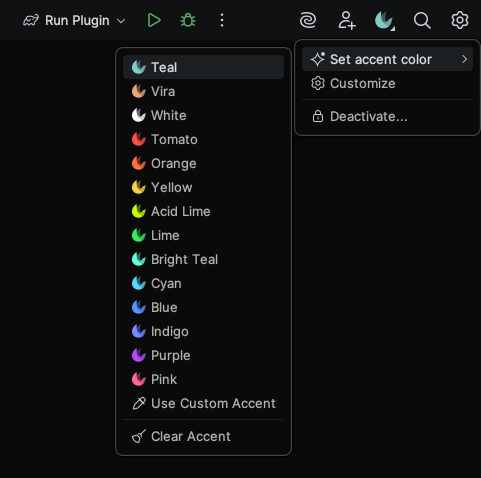
  • Moved all the plugin actions into a custom Vira Theme menu.  This new menu allows you to change the accent colour, open customisations and activate or deactivate the plugin.

    Preview of the new Vira Theme menu in IntelliJ

IMPROVED

  • Improved Islands UI in some areas of the shell

  • Aligned colors in lists for hovered and selected items. They now use the same color.

FIXED

  • Fix unstyled menu borders on Windows

  • Fix .kts file icons

  • Fix color glitches around the IDE

  • Fix blurred file and folders icons

  • Fix color for shortcuts in tooltips

January 26th, 2026

VS Code

NEW

  • Add new file icons.

  • Add a new command to the command palette that instantly deactivates the plugin. This command frees up the current activation slot, expires the trial period and disables or removes the plugin.

January 7th, 2026

JetBrains

This is the first stable release for Vira Theme on JetBrains IDEs! All the following changes are compared with the latest beta release.

NEW

  • Add new setting to change tree rows height for a more compact view

  • Add new file and folder icons

FIXED

  • Fixed internal mechanics about license activation and validation

  • Fixed rendering issue (blurred icons) in project tree

  • Fix icon for style/styles folders

January 4th, 2026

VS Code

NEW

  • Add new file and folders icons

IMPROVED

  • Fixed settings and customisations schema

  • Improved license management to prepare for new command to deactivate current Vira Theme copy.

November 14th, 2025

JetBrains

Hello! We’re thrilled to announce our first-ever beta release of the Vira Theme for the JetBrains IDE family.

While the IDE appears stable for most users, your feedback is crucial for finalising the first general release.  This beta can be activated for free by following the instructions on the provided link:

https://vira.build/jetbrains

November 13th, 2025

VS Code

Hello everyone, this new release focuses on internal fixes and introducing new icons.

You might also notice a rather significant new version. This is because we’re transitioning to a more robust versioning system, similar to those used by Apple, JetBrains, Sketch and others.  WIth the upcoming Vira Theme for JetBrains, this new approach will enable us to manage versioning more effectively across our products.

NEW

  • Add new file and folders icons for Kotlin, Puppeteer, oxlintrc, apollo, gradle

IMPROVED

  • Fixed some internal actions while applying customisations to user settings.

October 12th, 2025

VS Code

This release includes a new setting, new file icons and some fixes. Enjoy!

NEW

  • Add new setting to automatically sync file icons with the active theme. This is enabled by default. To use a different file icon disable this setting and switch your icon theme.

  • Add new file icons

IMPROVED

  • After some customers concerns, we updated the way license activations names are generated by removing potential sensitive informations from the default activation name. No sensitive data were used, but we wanted to avoid any confusion in the future.

FIXED

  • Improved the way you can switch to a built-in accent while a custom accent is set.

  • Fix an issue that was copying local workspace customization settings to global settings.

  • Fixed folder icon for the folder called it while expanded

September 15th, 2025

VS Code

Hey there! Guess what? Vira Theme is getting a cool new feature: product icons! Now, you can pick Vira UI Icons as your product icons, and it’ll update all the icons in your VS Code interface. This update is like a cherry on top, letting you enjoy an even better experience by mixing and matching Vira Theme, Vira File Icons, and Vira UI Icons. How awesome is that?

NEW

  • Add product icons. You can now swap VS Code UI icons to Vira with the command Preferences: Product Icon Theme

  • Add new file icons